- Published on
- Exercise 4
Deploy advanced cluster security
- Authors
- Name
With our Red Hat Advanced Cluster Security Operator installed and standing by to do some work for us, let's give it some work to do by telling it to deploy Red Hat Advanced Cluster Security onto our cluster.
4.1 - Getting familiar with rhacs
Before we get into the technical implementation let's take a moment to get up to speed with Red Hat Advanced Cluster Security works.
Fundamentally you install RHACS as a set of containers in your OpenShift Container Platform or Kubernetes cluster. RHACS includes the following services:
- Central services you install on a designated "hub" cluster. Central installs the Central, Scanner, and Scanner DB services. The Central service provides access to a user interface through a web UI or the RHACS portal. It also handles API interactions and provides persistent storage. Scanner analyzes images for known vulnerabilities. It uses Scanner DB as a cache for vulnerability definitions.
- Secured cluster services you install on each cluster you want to secure by RHACS. This installs the Collector, Sensor, and Admission Controller services. Collector collects runtime information on container security and network activity. It then sends data to Sensor, which monitors your Kubernetes cluster for policy detection and enforcement. Admission Controller monitors workloads and prevents users from creating them in RHACS when they violate security policies.
|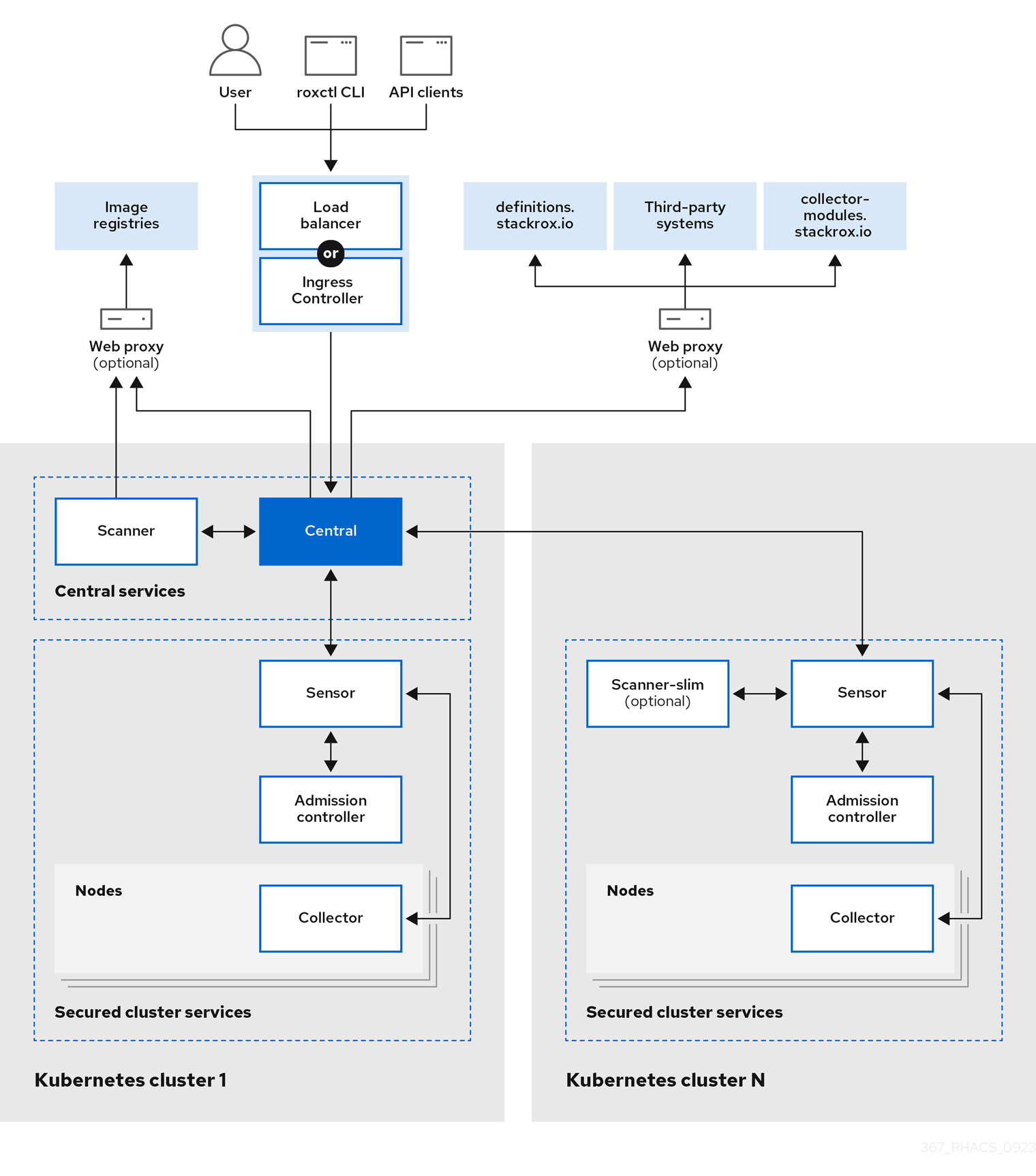 |
|:-----------------------------------------------------------------------------:|
| Red Hat Advanced Cluster Security high level architecture |
|
|:-----------------------------------------------------------------------------:|
| Red Hat Advanced Cluster Security high level architecture |
Note: For an overview of which sources Red Hat Advanced Cluster Security uses for vulnerability information and a more detailed walkthrough of each component, take a moment to review https://docs.redhat.com/en/documentation/red_hat_advanced_cluster_security_for_kubernetes/4.5/html-single/architecture/index.
4.2 - Deploying central services
Let's now create our Central services on our cluster by creating a new Central custom resource which our newly installed operator will then manage and deploy on our behalf. We'll deploy these services into a new namespace called acs-central.
cat << EOF | oc apply --filename -
---
apiVersion: v1
kind: Namespace
metadata:
  name: acs-central
spec:
  finalizers:
  - kubernetes

---
apiVersion: platform.stackrox.io/v1alpha1
kind: Central
metadata:
  name: stackrox-central-services
  namespace: acs-central
spec:
  central:
    exposure:
      route:
        enabled: true
  egress:
    connectivityPolicy: Offline
EOF
Note: The values we used for the
Centralinstance are all defaults, aside fromconnectivityPolicy: Offline, which tells Red Hat Advanced Cluster Security it will be operating in a disconnected environment. For more details on how RHACS works in a disconnected environment refer to https://docs.redhat.com/en/documentation/red_hat_advanced_cluster_security_for_kubernetes/4.5/html/configuring/enable-offline-mode.
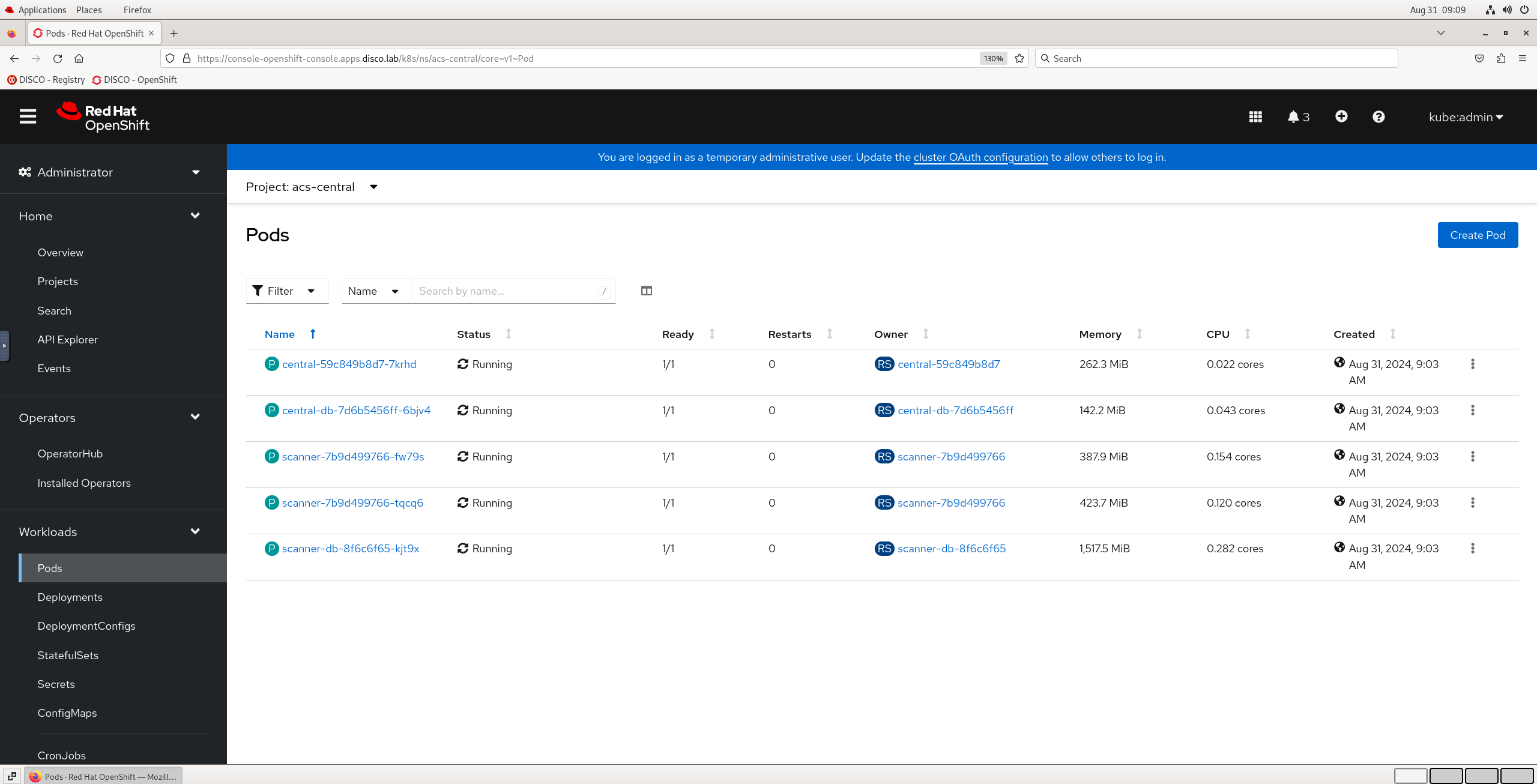
Once the Central resource has been created you can check the state of the RHACS pods by running oc get pods -n acs-central in your highside terminal. Or navigating to Workloads > Pods for the acs-central project in the OpenShift Web Console.
| |
|:-----------------------------------------------------------------------------:|
| Red Hat Advanced Cluster Security central pods |
|
|:-----------------------------------------------------------------------------:|
| Red Hat Advanced Cluster Security central pods |
Once all pods are Running and Ready you can move on to the next step.
4.3 - Logging into rhacs dashboard
Time to bring up our RHACS dashboard. We'll first retrieve the admin user password which was auto generated by the operator and stored in a Secret. Then we can open the Route for RHACS in a new browser tab and log in.
- Return to your vnc session and the open tab with our OpenShift Web Console.
- Click Workloads > Secrets, ensuring you are looking at the
acs-centralProject. - Click into the
central-htpasswdSecret - Scroll down and click Reveal values on the right hand side.
- Copy the
passwordfield, we'll need this shortly. - Navigate to Networking > Routes in the left hand menu.
- Click on the Location URL for the route named
central. - Login with the username
adminand the password you copied earlier.
Note: Ironically (given the subject matter), you may receive a tls verification warning when opening the rhacs dashboard. This is expected in this short lived workshop environment (because James is lazy) and should be accepted (Kids please don't do this at home 😂).
|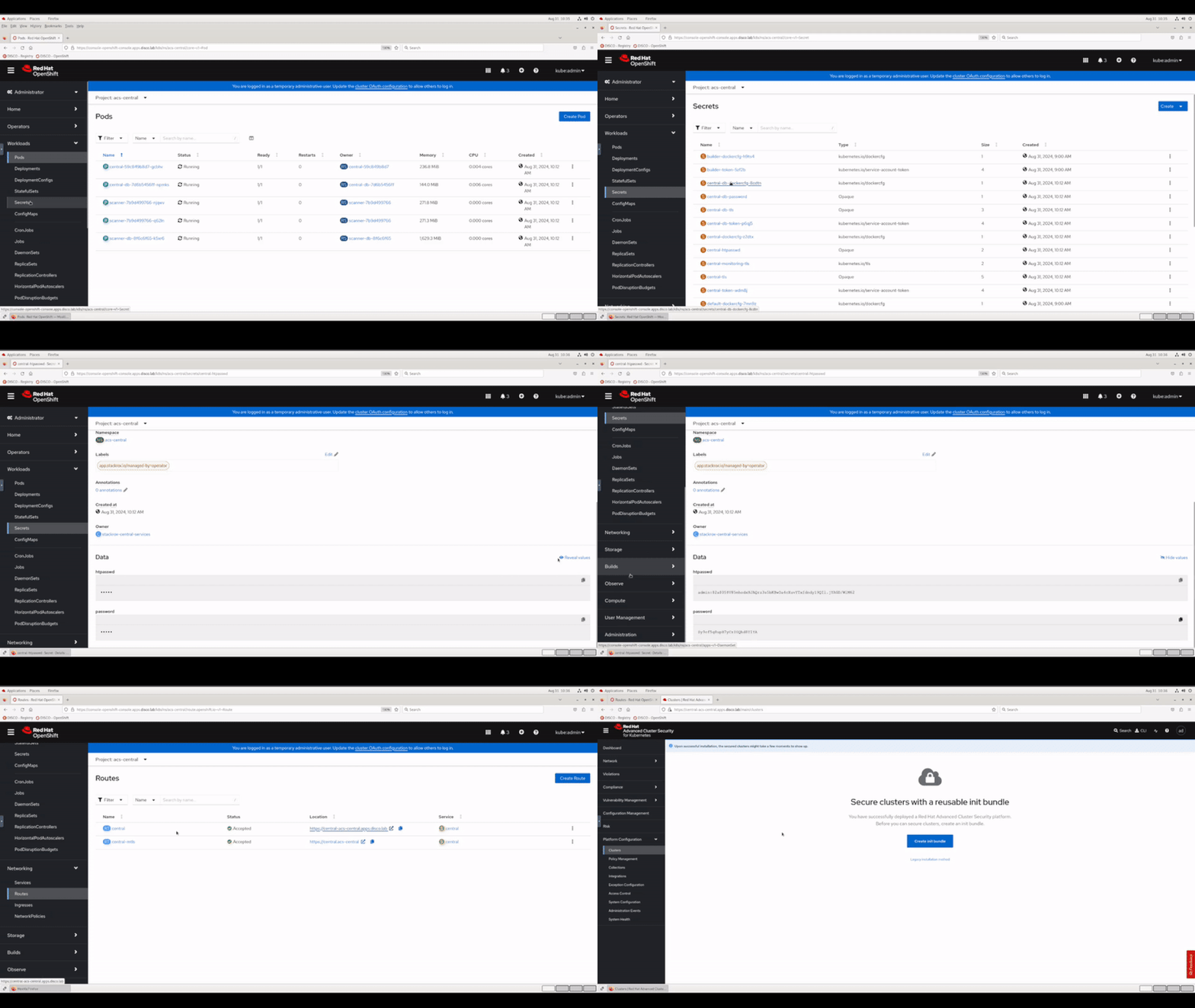 |
|:-----------------------------------------------------------------------------:|
| Logging into Red Hat Advanced Cluster Security dashboard |
|
|:-----------------------------------------------------------------------------:|
| Logging into Red Hat Advanced Cluster Security dashboard |
4.4 - Securing our hub cluster
To begin securing our OpenShift "hub" cluster with RHACS we need to:
- Generate an init bundle to download and apply to the cluster.
- Create and apply a
SecuredClustercustom resource.
We'll start with generating the init bundle. Just for future familiarity for this step we'll use and follow the official RHACS documentation: https://docs.redhat.com/en/documentation/red_hat_advanced_cluster_security_for_kubernetes/4.5/html/installing/installing-rhacs-on-red-hat-openshift#portal-generate-init-bundle_init-bundle-ocp
Follow the steps in 4.3.1.1 to generate an init bundle named hub using the RHACS dashboard, selecting the Operator based installation method.
Once the hub-Operator-secrets-cluster-init-bundle.yaml file has been downloaded we'll apply it to the cluster using the OpenShift Web Console Import YAML feature.
- Create a new project in the Web Console named
acs-securedcluster. - Click Import YAML in the top right of the OpenShift Web Console.
- Open your Downloads directory in the file browser using the Places top left menu.
- Open the
hub-Operator-secrets-cluster-init-bundle.yamlfile in a text editor and copy the contents. - Paste the contents into the Import YAML text field and click the blue Create button.
|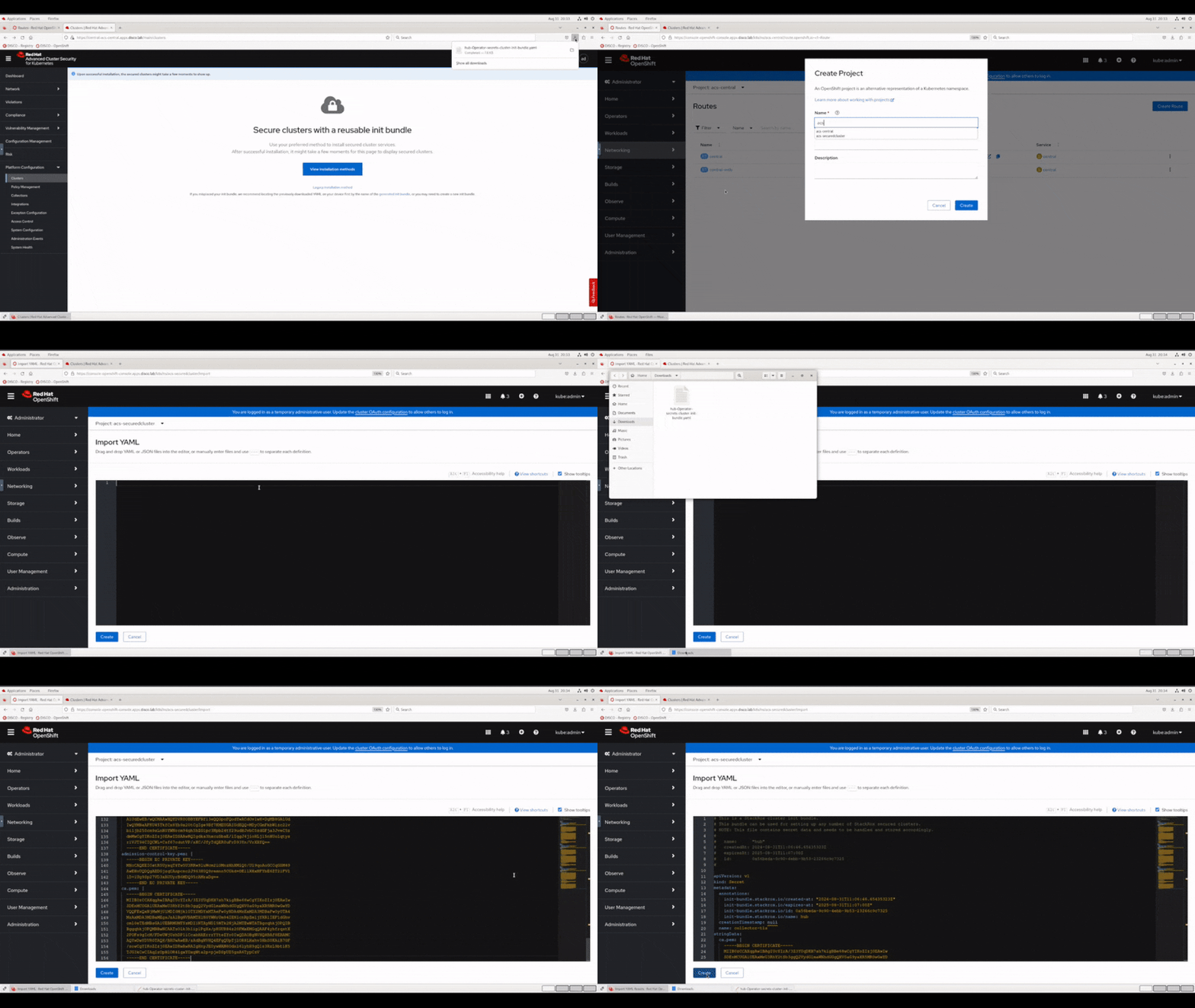 |
|:-----------------------------------------------------------------------------:|
| Importing an init bundle into our hub cluster |
|
|:-----------------------------------------------------------------------------:|
| Importing an init bundle into our hub cluster |
Note: These init bundles contain secrets enabling a secured cluster to communicate with RHACS Central so it's important to store these securely. For automation purposes you can also generate init bundles with the RHACS API or the
roxctlCLI, for exampleroxctl -e <ACS CONSOLE URL>:443 central init-bundles generate demo-cluster --output-secrets /tmp/demo-cluster.yaml --password <ACS ADMIN PASSWORD>.
Once our init bundle has been created we can create our SecuredCluster custom resource to complete the cluster onboarding process. We'll do that with our oc terminal session.
Copy the command below and run it in your highside web terminal:
cat << EOF | oc --namespace acs-securedcluster apply --filename -
apiVersion: platform.stackrox.io/v1alpha1
kind: SecuredCluster
metadata:
  name: stackrox-secured-cluster-services
spec:
  monitoring:
    openshift:
      enabled: true
  auditLogs:
    collection: Auto
  network:
    policies: Enabled
  admissionControl:
    listenOnUpdates: true
    bypass: BreakGlassAnnotation
    contactImageScanners: ScanIfMissing
    listenOnCreates: true
    replicas: 3
    timeoutSeconds: 10
    listenOnEvents: true
  scannerV4:
    db:
      persistence:
        persistentVolumeClaim:
          claimName: scanner-v4-db
    indexer:
      scaling:
        autoScaling: Enabled
        maxReplicas: 5
        minReplicas: 2
        replicas: 3
    scannerComponent: Default
  scanner:
    analyzer:
      scaling:
        autoScaling: Enabled
        maxReplicas: 5
        minReplicas: 2
        replicas: 3
    scannerComponent: AutoSense
  perNode:
    collector:
      collection: CORE_BPF
      forceCollection: false
      imageFlavor: Regular
    taintToleration: TolerateTaints
  clusterName: hub
  centralEndpoint: 'https://central-acs-central.apps.disco.lab:443'
EOF
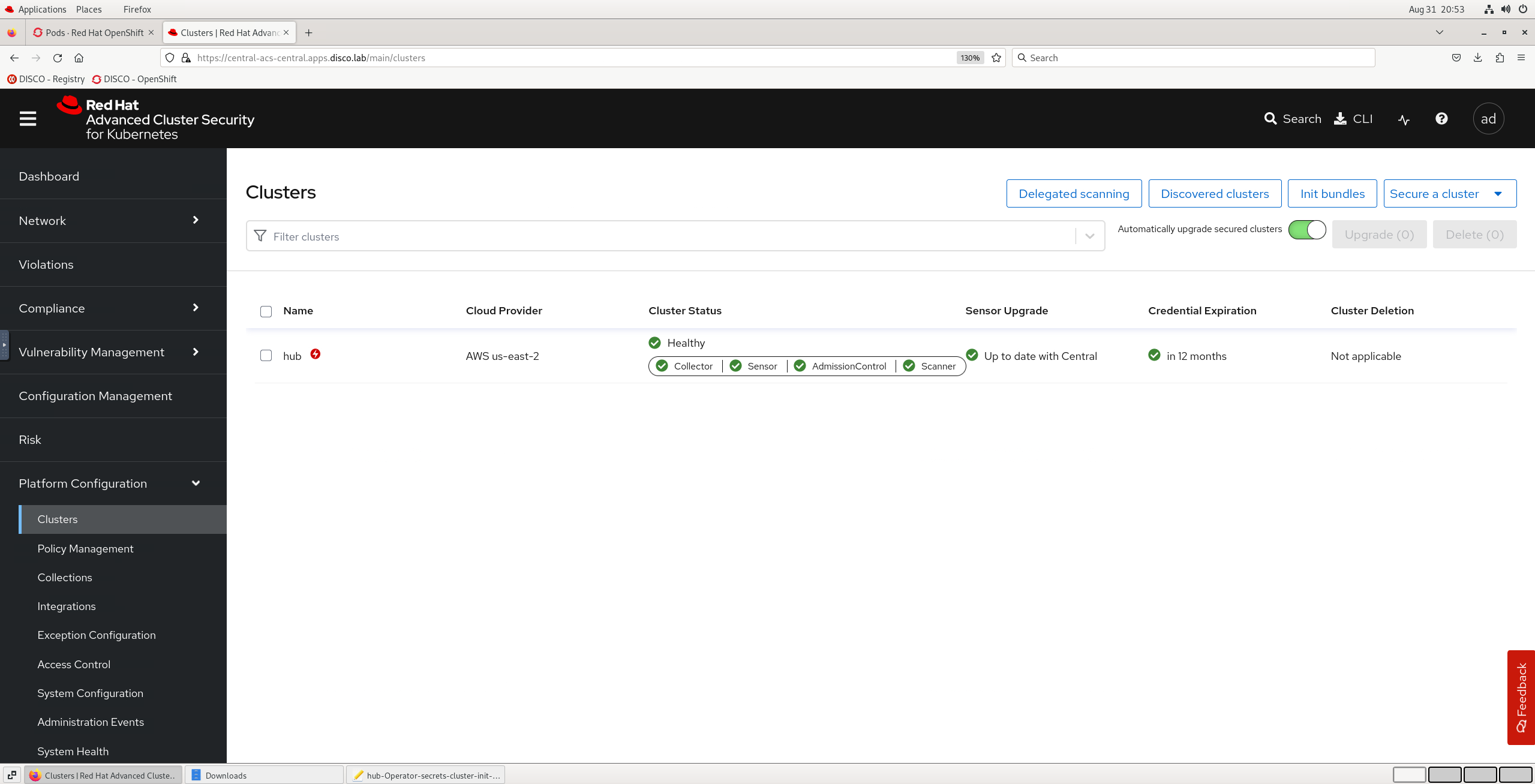
After a short wait for pods to initialise in the acs-securedcluster namespace you should be able to see the cluster is now secured in RHACS by checking the Platform Configuration > Clusters overview which should show the hub cluster as ✅ Healthy.
| |
|:-----------------------------------------------------------------------------:|
| Hub cluster is now secured by Red Hat Advanced Cluster Security |
|
|:-----------------------------------------------------------------------------:|
| Hub cluster is now secured by Red Hat Advanced Cluster Security |
If you now have Red Hat Advanced Cluster Security Central and SecuredCluster components deployed then congratulations your RHACS instance is fully deployed and you're ready to start improving your cluster security and compliance posture in Exercise 5! 🎉